Your therapy practice homepage may be saying too much
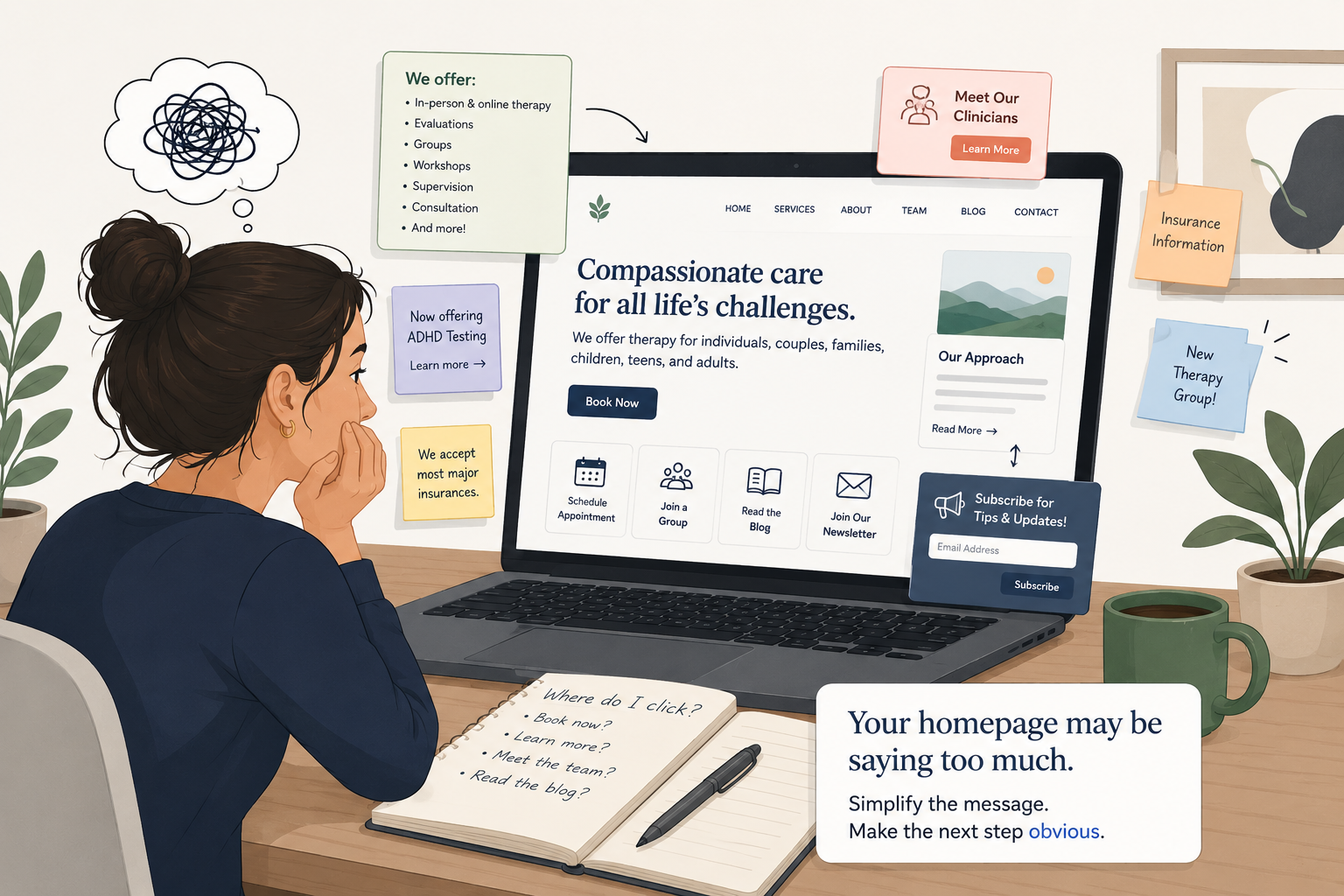
Your homepage may be clear to you, but confusing to someone who is trying to decide whether your practice is the right next step.
Have you ever opened your own homepage and thought, “We do a lot. I need people to know all of it”?
You are not alone.
Many therapy practice owners keep adding to the homepage because the practice keeps growing. A new service gets added. A new clinician joins. A group opens. Testing is added. Telehealth expands. Insurance changes. A referral partner asks for more details. Someone says, “We should put that on the website.”
So the homepage starts carrying everything.
None of those messages may be wrong. But together, they can make the next step harder to see.
Why this matters
Visitors are scanning, not studying
Your homepage has a few seconds to help someone understand, “Is this for me, and what should I do next?”
People do not usually read therapy practice homepages like a brochure.
They scan.
They may be comparing a few practices. They may be looking on their phone. They may be tired, anxious, skeptical, or unsure whether therapy is the right next step.
One useful data point
That does not mean your homepage has to be cold or salesy.
It means the first few seconds need to reduce confusion.
Why this feels hard
SimplePractice’s 2025 private practice report analyzed aggregated data from more than 245,000 clinicians and survey insights from more than 2,200 clinicians. In other words, private practice owners are not guessing alone. Many are trying to make practical business decisions while also carrying clinical work, admin questions, client care, and team needs.
The problem
Your homepage may be answering too many questions at once
A homepage has one main job: help the right visitor understand where they are and what to do next.
But many practice homepages try to do several jobs at the same time.
- They try to explain every service.
- They try to speak to every possible client.
- They try to reassure referral partners.
- They try to showcase every clinician.
- They try to answer every insurance question.
- They try to promote new groups, testing, hiring, workshops, and blog posts.
Again, each message may matter. The issue is not that the information is useless.
The issue is that when every message is given equal weight, the visitor has to decide what matters most.
And visitors who are stressed, overwhelmed, or comparing multiple practices may not have the energy to sort through all of it.
They may leave thinking, “This seems nice, but I’m not sure where to start.”
Or, “I don’t know if they help with my situation.”
Or, “I’ll come back later.”
Later often means never.
The tip
Remove or simplify one competing message
Do not redesign the whole site. Start by finding one message that is competing with the main next step.
A competing message is anything that pulls attention away from the clearest path forward.
It might be a long paragraph about your full practice history.
It might be a banner promoting a group that is not currently open.
It might be a list of 18 specialties above the contact button.
It might be several buttons near each other: “Book now,” “Meet the team,” “Read our blog,” “Join our newsletter,” and “Learn about our approach.”
It might be a section that made sense two years ago but no longer reflects how the practice works.
This week’s action
Choose one competing message and either remove it, move it lower on the page, or rewrite it so it supports the main next step.
This is not about hiding important information.
It is about putting information in the right order.
Your homepage does not need to say everything. It needs to help the right person take the next step.
How to choose
Look at the first screen on your phone
Your mobile homepage will often reveal the clutter faster than your desktop view.
Open your homepage on your phone.
Not your desktop. Not your website editor. Your phone.
Now look only at the first screen before you scroll.
- Can a new visitor tell who you help?
- Can they tell what kind of support you offer?
- Can they see the next step?
- Is there anything on this first screen that distracts from that next step?
If the answer is yes, choose one thing to simplify.
For many therapy practices, the first screen should not carry five different priorities. It usually needs a clear headline, a short supporting sentence, and one obvious next step.
That next step might be scheduling a consultation, requesting an appointment, contacting the intake team, finding the right clinician, or calling the office.
The wording depends on your practice. The key is that it should be obvious.
Example
What this can look like in a practice
The goal is not to make the practice sound smaller. The goal is to make the first step clearer.
Before:
“Compassionate therapy for individuals, couples, families, children, teens, adults, and professionals navigating anxiety, depression, trauma, ADHD, grief, life transitions, relationship concerns, parenting stress, and more. We offer in-person and online therapy, evaluations, groups, workshops, supervision, and consultation. Read our blog, meet our clinicians, sign up for our newsletter, or contact us today.”
This sounds warm. It is also a lot.
A visitor may wonder:
- Do they help adults like me?
- Do I need therapy or an evaluation?
- Should I read first or contact them?
- Are they taking new clients?
- Which clinician should I choose?
After:
“Therapy for adults and teens who want support with anxiety, stress, relationships, and major life changes.”
“Our intake team can help you find the right-fit clinician, appointment type, and next step.”
Button: Request a consultation
The other information does not disappear.
Services can still live on service pages. Clinician details can still live on bio pages. Insurance can still have its own section. Groups can still have a page.
But the homepage no longer asks the visitor to sort through everything at once.
Quick check
Which message is competing most with the next step?
Look at your homepage and count how many different actions you are asking visitors to take.
Are you asking them to book, call, read, subscribe, explore, meet the team, view all services, check insurance, follow social media, download something, and join a group?
If so, your homepage may not have a design problem.
It may have a priority problem.
Pick the issue that feels most true right now.
Message overload: you are trying to explain every service at once.
Button overload: visitors have too many actions to choose from.
Audience overload: the page is trying to speak to everyone equally.
Old information: the page still highlights something that is no longer a main priority.
Unclear next step: the visitor may understand the practice but not what to do next.
Then make one small change this week.
Remove the competing message.
Move it lower.
Or rewrite it so it supports the main next step.
Before changing the whole website, write one sentence that explains what the homepage should make clear first.
“The homepage should help anxious adults know we offer therapy in Maryland and show them how to request a consultation.”
Or:
“The homepage should help parents of teens understand that we offer teen therapy and show them how intake works.”
Once you know the main job, it becomes easier to spot the extra message that can be removed, moved, or simplified.
A clear homepage does not need to say less because your practice is simple.
It needs to say less because your visitors are busy, scanning, and often unsure what to do next.
Try removing one competing message this week.
Not everything.
Just one.
Your homepage may feel stronger when it stops trying to carry the whole practice at once.
Want help finding where your website is making the next step harder than it needs to be? A website clarity sprint can help you simplify the path from first visit to inquiry.
